
Inbound marketing automation uses software to attract, nurture, and convert leads through automated, personalized workflows—without manual effort at every step. It combines content, email, CRM, and behavioral triggers to move prospects through the funnel efficiently, helping businesses generate more qualified leads and scale growth consistently.
Generating leads is one thing. Turning them into loyal customers—consistently, at scale—is another challenge entirely. That’s where inbound marketing automation becomes a game-changer for modern businesses.
Traditional inbound marketing relies heavily on manual effort: sending emails one by one, following up with prospects at the right time, tracking which content resonates with which audience segment. It works, but it doesn’t scale. As your audience grows, the cracks begin to show. Leads slip through, follow-ups get delayed, and your team spends more time on repetitive tasks than on strategy.
Inbound marketing automation solves this by letting technology handle the repetitive, time-sensitive touchpoints while your team focuses on what actually requires human judgment. The result? Faster lead nurturing, smarter segmentation, higher conversion rates, and a more predictable revenue pipeline.
This guide walks you through everything you need to know—how it works, the best practices to follow, the tools worth investing in, and how to build workflows that actually move the needle. Whether you’re just getting started or looking to optimize an existing system, this is your roadmap.
How Inbound Marketing Automation Works
At its core, inbound marketing automation is the process of using software to execute, manage, and optimize marketing activities based on user behavior and predefined rules. Rather than broadcasting the same message to everyone, automation enables marketers to deliver the right content to the right person at the right time—automatically.
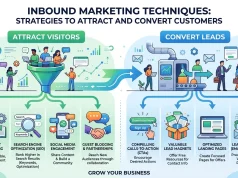
Here’s a simplified breakdown of how the process flows:
- Attract: A visitor discovers your brand through organic search, social media, or content.
- Capture: They engage with a lead magnet, fill out a form, or subscribe to your newsletter.
- Nurture: Automated workflows deliver relevant content based on their behavior and interests.
- Convert: Leads are scored, qualified, and handed off to sales—or converted directly through automated sequences.
- Retain: Post-purchase automation keeps customers engaged and encourages repeat business.
The engine behind all of this is data. Every click, page visit, email open, and form submission feeds into your automation system, allowing it to personalize experiences and trigger the right actions at the right moment.
What triggers inbound marketing automation workflows?
Triggers are the conditions that set an automation in motion. Common examples include:
- A user downloading a lead magnet
- A contact visiting a pricing page more than twice
- A prospect not engaging with emails for 30 days
- A lead reaching a certain score threshold
These behavioral signals give your automation system the context it needs to respond in a way that feels relevant—not robotic.
Inbound Marketing Automation Best Practices

Automation is only as effective as the strategy behind it. Poorly designed workflows can frustrate prospects, damage brand trust, and result in higher unsubscribe rates. These best practices help you build automation that converts.
Map your buyer’s journey before building any workflow
Before touching your automation platform, understand the stages your leads go through—from awareness to consideration to decision. Each stage requires a different type of content and communication. A first-time visitor needs education; a returning visitor comparing solutions needs validation; a prospect who requested a demo needs urgency and clarity.
Mapping this journey upfront ensures your inbound marketing automation workflows are aligned with where each contact actually is—not where you hope they are.
Segment your audience with precision
Broad, one-size-fits-all automation rarely performs well. Segment your contacts by factors like industry, behavior, lead source, and engagement level. The more specific your segments, the more relevant your messaging—and relevance drives conversions.
For example, a SaaS company might segment leads into “small business owners” and “enterprise decision-makers” and deliver entirely different nurture sequences to each group, even if they downloaded the same initial lead magnet.
Set clear goals for every workflow
Each automation workflow should serve a single, measurable objective—whether that’s booking a call, downloading a resource, completing onboarding, or re-engaging dormant leads. When a workflow tries to do too much, it loses focus and performance suffers.
Test and optimize continuously
A/B test your subject lines, CTAs, send times, and content formats. Automation gives you access to a wealth of performance data—use it. Small improvements compound significantly over time, especially across high-volume email sequences.
Maintain a human tone throughout
Automated doesn’t have to mean impersonal. Write your emails and messages as if a real person is speaking directly to the recipient. Use first-person language, reference specific actions the contact has taken, and avoid formal or robotic phrasing.
Inbound Marketing Automation Tools
Choosing the right platform is critical. The best tool for your business depends on your team size, budget, existing tech stack, and growth goals. Here’s an overview of the leading options:
|
Tool |
Best For |
Key Features |
Starting Price |
|---|---|---|---|
|
HubSpot |
All-in-one inbound teams |
CRM, email, workflows, landing pages |
Free (paid from $50/mo) |
|
ActiveCampaign |
SMBs focused on email |
Advanced email automation, CRM lite |
From $29/mo |
|
Marketo (Adobe) |
Enterprise marketing teams |
Lead scoring, multi-channel automation |
Custom pricing |
|
Mailchimp |
Beginners and small businesses |
Email automation, basic segmentation |
Free (paid from $13/mo) |
|
Pardot (Salesforce) |
B2B Salesforce users |
Deep CRM integration, lead nurturing |
From $1,250/mo |
|
Klaviyo |
E-commerce brands |
Behavioral triggers, revenue tracking |
Free (paid from $20/mo) |
When evaluating platforms for inbound marketing automation, prioritize native CRM integration, workflow flexibility, and reporting capabilities. The cheapest option is rarely the most cost-effective in the long run if it limits your ability to scale.
HubSpot vs. ActiveCampaign: Which should you choose?
Choose HubSpot if you need an all-in-one platform with built-in CRM, landing page builder, and a unified dashboard for your entire inbound strategy. The free tier is genuinely useful for early-stage businesses.
Choose ActiveCampaign if email automation is your primary focus and you want more advanced conditional logic without the premium price tag of HubSpot’s paid tiers.
Inbound Marketing Workflow Automation
Workflows are the building blocks of inbound marketing automation. A well-designed workflow guides a prospect through a series of touchpoints—emails, notifications, content recommendations, or sales alerts—based on their behavior.
What does an effective inbound workflow look like?
Here’s an example of a lead nurturing workflow for a B2B SaaS company:
Trigger: Contact downloads a free eBook on “Reducing Customer Churn.”
- Day 0: Deliver the eBook via email. Include a brief welcome message.
- Day 2: Send a follow-up email with a related case study.
- Day 4: Share a blog post addressing a common pain point related to the eBook topic.
- Day 7: Send a soft CTA email inviting the contact to explore a product demo.
- Day 10: If no demo booked, send a social proof email (customer testimonials, results data).
- Day 14: Final check-in email with a low-friction offer (free trial, consultation call).
Each step is triggered automatically, but the messaging feels timely and relevant because it’s connected to what the lead has already shown interest in.
Re-engagement workflows for cold leads
Not every lead converts during the initial nurture sequence. Re-engagement workflows help you win back contacts who have gone quiet. A typical re-engagement sequence includes a “We miss you” message, a compelling offer or updated resource, and a clear opt-out option—which actually improves your list hygiene and deliverability.
Marketing Automation for Lead Generation
Lead generation is where inbound marketing automation has some of its most measurable impact. By combining content marketing, SEO, and automated follow-up systems, businesses can build lead generation engines that run around the clock.
How does automation accelerate lead generation?
The speed of follow-up matters more than most marketers realize. According to a study by Harvard Business Review, companies that contact leads within one hour are seven times more likely to qualify those leads than companies that wait even two hours.
Automation makes instant follow-up the default. The moment a prospect submits a form, they receive a personalized response—no waiting, no manual intervention. This immediacy dramatically improves the likelihood of conversion.
Lead scoring: qualifying leads automatically
Lead scoring assigns numerical values to contacts based on their behavior and demographic data. For example:
- Visits pricing page: +15 points
- Opens three emails in a row: +10 points
- Downloads a case study: +20 points
- Job title matches your ICP: +25 points
- Unsubscribes from one email: –10 points
When a contact crosses a score threshold—say, 75 points—your system automatically alerts a sales rep or triggers a high-intent workflow. This ensures sales only spends time on leads who are genuinely ready to have a conversation.
Inbound Email Marketing Automation
Email remains one of the highest-ROI channels available to marketers. According to Litmus (2023), email marketing delivers an average return of $36 for every $1 spent. Inbound email marketing automation amplifies this by ensuring every email is relevant, timely, and behavior-driven.
Types of automated email sequences to build
Welcome sequences: The first impression matters. A well-crafted welcome sequence introduces new subscribers to your brand, sets expectations, and delivers immediate value. Aim for three to five emails spread over the first two weeks.
Drip campaigns: Drip campaigns deliver pre-written content on a fixed schedule. These work well for educating leads about your product, sharing thought leadership content, or guiding prospects through a free trial.
Behavioral trigger emails: These are sent in response to specific actions—visiting a product page, abandoning a cart, completing a form, or hitting a milestone in your platform. Behavioral emails consistently outperform scheduled campaigns because they respond to demonstrated intent.
Re-engagement campaigns: Sent to contacts who haven’t engaged in 60 to 90 days. These emails aim to rekindle interest or confirm that the contact still wants to hear from you.
What email metrics should you track in inbound marketing automation?
|
Metric |
Industry Benchmark |
Why It Matters |
|---|---|---|
|
Open Rate |
20–30% (B2B) |
Measures subject line effectiveness |
|
Click-Through Rate |
2–5% |
Measures content relevance and CTA strength |
|
Conversion Rate |
1–3% |
Measures overall campaign effectiveness |
|
Unsubscribe Rate |
< 0.5% |
Flags messaging or frequency issues |
|
Bounce Rate |
< 2% |
Indicates list health |
Track these metrics at the workflow level, not just the individual email level. Patterns across a sequence reveal more than any single data point.
CRM and Inbound Marketing Automation
CRM (Customer Relationship Management) integration is what transforms isolated automation tasks into a cohesive, data-driven growth system. When your CRM and marketing automation platform work together, every interaction a lead has with your brand—from the first blog visit to the final purchase—is recorded, tracked, and used to personalize future communications.
How does CRM integration enhance inbound marketing automation?
Without CRM integration, your automation platform operates in a silo. It knows what emails a contact opened, but not what conversations they’ve had with your sales team. Your sales team knows who they’ve spoken to, but not which content those leads engaged with.
CRM integration closes this gap. When a lead scores high enough in your automation platform, that data flows directly into your CRM, giving sales reps full context before they make contact. Conversely, when a deal is closed or lost in the CRM, that status updates the contact’s automation journey automatically—preventing the awkward scenario of sending nurture emails to someone who already bought.
Best CRM platforms for inbound marketing automation
HubSpot CRM: The most seamless integration for inbound teams, since marketing automation and CRM are natively built into the same platform. Ideal for businesses that want simplicity and a unified view of their pipeline.
Salesforce + Pardot: The enterprise standard. Pardot (now Salesforce Marketing Cloud Account Engagement) offers deep automation capabilities with full Salesforce CRM integration. Best for large B2B organizations with complex sales cycles.
Zoho CRM + Zoho Campaigns: A cost-effective option for SMBs that need solid CRM-automation integration without the HubSpot price tag.
ActiveCampaign CRM: For teams that prioritize email automation and want a lightweight CRM built in, ActiveCampaign’s pipeline feature offers a practical middle ground.
Key CRM-automation integration features to look for
- Bi-directional data sync between platforms
- Automatic lead assignment based on score or segment
- Deal stage triggers that update automation enrollment
- Activity logging across both platforms
- Sales alert notifications for high-intent behaviors
Measuring the Success of Your Inbound Marketing Automation Strategy
Building automation is only half the work. Measuring its performance—and iterating based on what the data tells you—is what separates teams that grow from those that plateau.
Which KPIs matter most for inbound marketing automation?
Lead-to-customer conversion rate: The percentage of leads that eventually become paying customers. This is the ultimate measure of whether your automation nurtures leads effectively or just keeps them engaged indefinitely.
Time to conversion: How long does it take a lead to move from first contact to customer? Effective automation should shorten this window. Track it by segment and by traffic source to identify where delays occur.
Email engagement by workflow stage: Open and click rates shouldn’t be flat across a sequence. Engagement typically drops as leads move further through a workflow—but sharp drops at specific emails signal content or messaging problems.
MQL to SQL conversion rate: Marketing Qualified Leads (MQLs) are scored by marketing; Sales Qualified Leads (SQLs) are accepted by sales. A low MQL-to-SQL rate suggests your lead scoring model needs calibration.
Revenue attributed to automation: The clearest indicator of ROI. Use UTM tracking and CRM attribution to connect closed deals back to the automation workflows that influenced them.
The Road Ahead: Building an Inbound Engine That Compounds

Inbound marketing automation delivers its greatest value when it’s treated as a long-term system rather than a short-term tactic. The workflows you build today generate data that improves your targeting tomorrow. The content assets you create compound in search rankings and lead capture over time. The lead scoring models you refine become increasingly accurate as more contacts move through your funnel.
Start with the fundamentals: choose a platform that integrates with your CRM, map your buyer’s journey, and build two or three core workflows. Measure relentlessly, optimize regularly, and expand as your data grows.
Businesses that commit to inbound marketing automation early don’t just generate more leads—they build a predictable, scalable growth engine that becomes harder for competitors to replicate with every passing month.
Frequently Asked Questions
What is inbound marketing automation?
Inbound marketing automation is the use of software to automate marketing tasks—like email follow-ups, lead scoring, and content delivery—based on user behavior and predefined rules. It helps businesses attract, nurture, and convert leads without requiring manual effort at every step.
How is inbound marketing automation different from outbound automation?
Inbound automation responds to actions a prospect has already taken—like downloading a resource or visiting a product page. Outbound automation pushes messages to cold audiences without prior engagement. Inbound automation tends to produce higher-quality leads because it’s permission-based and behavior-driven.
What is the best tool for inbound marketing automation for small businesses?
HubSpot and ActiveCampaign are the most widely recommended platforms for small businesses. HubSpot offers a free CRM and a generous free marketing tier. ActiveCampaign provides more advanced email automation at a lower price point for teams that don’t need a full CRM.
How long does it take to see results from inbound marketing automation?
Most businesses see measurable improvements in lead engagement within the first 30 to 60 days of launching automated workflows. Significant improvements in conversion rates and pipeline velocity typically emerge after three to six months, once workflows have been tested and optimized.
What is lead scoring in inbound marketing automation?
Lead scoring is a system that assigns point values to contacts based on their behavior and profile data. When a lead reaches a set score threshold, it triggers a specific action—like a sales alert or a high-intent email workflow. Lead scoring ensures that sales teams spend their time on the most qualified prospects.
Can inbound marketing automation work without a CRM?
Technically yes, but the results are significantly limited. CRM integration allows your automation platform to access contact history, deal stages, and sales activity—making your workflows smarter and your lead handoff process seamless. For any team with a defined sales process, CRM integration is essential.
How much does inbound marketing automation cost?
Costs vary widely depending on the platform and your contact volume. Entry-level plans for tools like Mailchimp and ActiveCampaign start at $13–$29 per month. Mid-market platforms like HubSpot’s Marketing Hub start around $50–$800 per month. Enterprise platforms like Marketo and Pardot use custom pricing that can reach thousands of dollars monthly.